
Perplexity to Notion
Export Perplexity to Notion in one click or in bulk. Save searches, Spaces, Computer Tasks, sources, and related questions in a searchable Notion database.
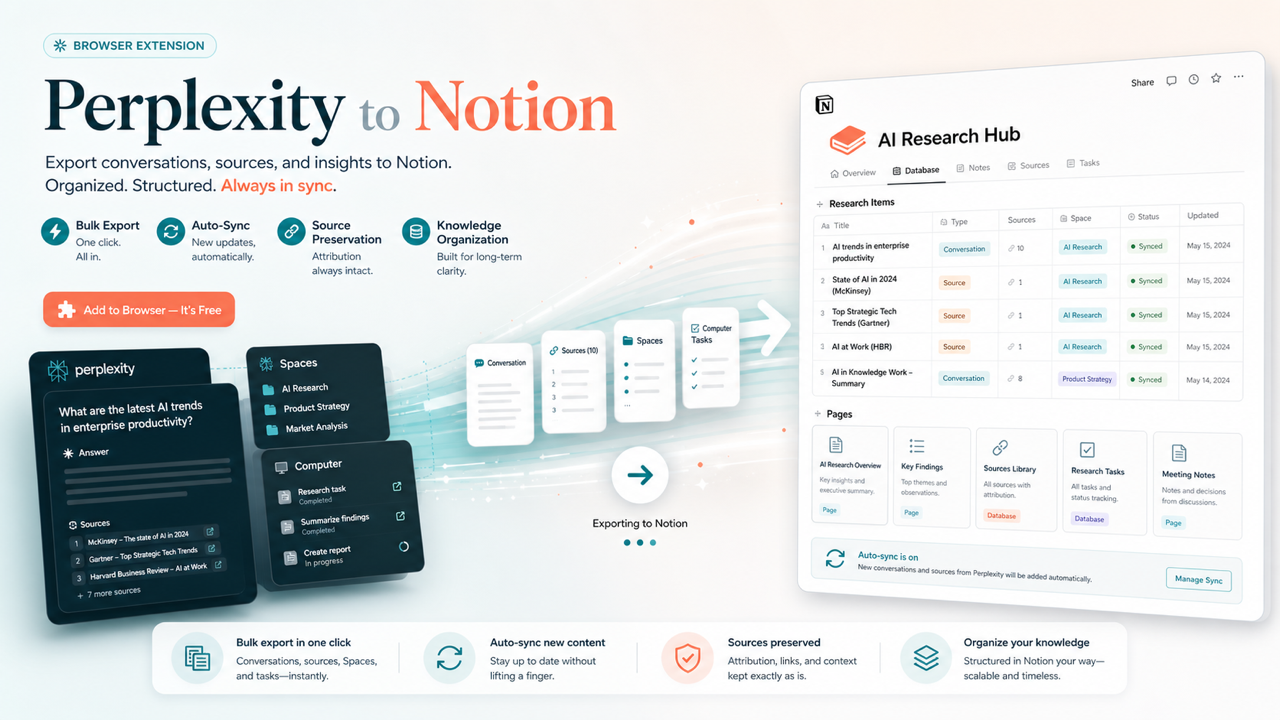
Keep every useful Perplexity answer, source, and project trail searchable in the Notion workspace you already use.
Bulk and batch export compatibility
What Perplexity to Notion can bulk export
Batch Export can save selected records or bulk-export complete Perplexity history, Computer Tasks, and conversations from one or multiple Spaces to Notion.
| Content type | Support | Export result | Notes |
|---|---|---|---|
| Bulk and batch export | Core feature | Selected records or complete history | Use All Threads, Computer Tasks, or one or multiple Spaces with date filtering, progress, cancellation, and local export history. |
| Standard Perplexity searches | Supported | Structured Notion page | Supports multi-turn /search/ threads and paginated thread detail. |
| Perplexity Spaces | Supported | One or multiple Spaces | Space Name is written when collection metadata is available. |
| Perplexity Computer Tasks | Supported | Task content with Task tag | Works for current-page and batch export. |
| Sources and Related Questions | Optional | Numbered Sources and follow-up questions | Controlled by the Include Sources & Related Questions setting. |
| Embedded Perplexity documents | Supported when content is available | Notion child pages | The document asset must expose source content to the extension. |
| Local Markdown download | Use Perplexity to Obsidian | Local Markdown and Obsidian-ready files | Need local Markdown? Use Perplexity to Obsidian for Markdown files and an Obsidian-ready archive. |
Output proof
Real export examples
Use these examples to verify what exported files, folders, or destination pages look like before installing.
Current Search Saved to Notion
A real v3.2 export with source properties and editable YOU and Perplexity sections.
Batch Export Workspace
The v3.2 workspace for Notion authorization, database selection, sync settings, data sources, progress, and history.
Current-Page Export
The popup detects a supported Perplexity search and provides Save to Notion and Batch Export actions.
Built for source-rich Perplexity research in Notion
Save one answer or bulk-export complete research history with Spaces, Computer Tasks, sources, related questions, and repeat-backup controls.
One-Click Perplexity Export
Save the Perplexity search or Computer Task you are viewing to Notion without copying, pasting, or rebuilding the formatting.
Bulk & Batch Export
Back up your complete Perplexity history or selected research from All Threads, Computer Tasks, and one or multiple Spaces in a single workflow.
Date Filtering
Save only recent research when you do not need to process your entire history again.
URL-Based Sync Rules
Choose whether repeat exports skip an existing Notion page, refresh it, or create a new copy.
Sources & Related Questions
Preserve the evidence and follow-up ideas behind each answer, or leave them out when you want a more compact note.
Perplexity Documents
Keep supported documents attached to a conversation as organized Notion child pages instead of losing them during export.
Scheduled Auto-Sync
Schedule recurring backups while the Batch Export page and a connected Perplexity tab stay open.
Progress, Failures & History
See what was saved, skipped, or failed, stop a run when needed, and review previous exports before starting another backup.
Computer Task Metadata
Keep Computer Tasks and Space-based research identifiable in Notion with useful task, Space, URL, and time metadata.
Known limits
Export boundaries and fixes
Clear limits build trust. These are the cases to check before running large exports.
Auto-Sync is page-based
Scheduled backups pause when the Batch Export page or Chrome is closed, or when the computer sleeps.
Keep Batch Export and one refreshed Perplexity tab open while a scheduled backup is active.
Troubleshooting guideFree export allowance
The free plan includes an allowance for trying current-page saves and the batch workflow.
Start with your most valuable conversations, then upgrade when you need unlimited batch exports.
Troubleshooting guideA compatible Notion database is required
Exports need a Notion database with compatible title, URL, and Chat Time properties.
Use the provided Notion template for the quickest setup, or check the required properties before exporting.
Troubleshooting guideKeep a signed-in Perplexity tab available
The extension needs an open, signed-in Perplexity tab to read the research you choose to export.
Refresh the Perplexity tab after installing or updating the extension.
Troubleshooting guideHow it Works
Related resources Perplexity to Notion
Use these guides and docs to solve common export, backup, and troubleshooting workflows.
Guides
How to export Perplexity to Notion or Obsidian
Choose the right destination for a searchable Notion database or a local Markdown research archive.
Export Perplexity sources with your research
Preserve citations, related questions, and the research trail behind each Perplexity answer.
Back up Perplexity conversations securely
Build a repeatable backup workflow for important searches instead of leaving them scattered in history.
Bulk export Perplexity chats
Learn when batch export is faster than saving individual conversations and how to organize the result.
What's New
v3.2.0: Refreshed the popup and Batch Export UI and grouped exported conversations under clear H1 YOU and Perplexity sections.
Added embedded Perplexity document export as Notion child pages and improved complex nested Markdown conversion.
Added current-page and bulk export support for Perplexity computer tasks.
Frequently Asked Questions About Perplexity to Notion
Have another question? Contact us on Discord or by email.
How do I export Perplexity to Notion?
Install Perplexity to Notion, connect your Notion workspace, and choose a target database. You can then save the current search in one click or open Batch Export to move selected conversations, Spaces, Computer Tasks, or your complete history.
Can I bulk export my complete Perplexity history to Notion?
Yes. Choose All Threads in Batch Export, load your conversations, and save all or only the records you select. A date filter helps when you only want recent research.
Can I export from multiple Perplexity Spaces?
Yes. Choose From Spaces and select one or more Spaces to keep project, client, or topic research organized during a batch export.
Will repeat exports create duplicate Notion pages?
You control that behavior. Choose to skip an existing page, overwrite it with the latest version, or always create a new page.
Can I export Perplexity sources and related questions to Notion?
Yes. Sources and Related Questions can travel with the conversation so the answer keeps its research context. You can turn them off when you prefer a shorter Notion page.
What happens to attached Perplexity documents?
When a supported embedded document is available, the extension saves it as a Notion child page and keeps its reference near the matching part of the conversation.
Does scheduled Perplexity backup run after I close Chrome?
No. Keep the Batch Export page and a connected Perplexity tab open while Auto-Sync is active. Closing Chrome or putting the computer to sleep pauses the schedule.
Can Perplexity to Notion download Markdown files?
This extension is focused on Notion and does not expose a local Markdown download button. For local Markdown files and an Obsidian-ready archive, use Perplexity to Obsidian.
Can I try Perplexity to Notion for free?
Yes. The free plan includes an export allowance so you can test the current-page and batch workflows with your own research. Upgrade when you need unlimited batch exports.
Is my Perplexity research stored on another export service?
Your selected content is sent from the browser to the Notion workspace you authorize. The extension does not use a separate conversation-storage workspace.
Build a complete Perplexity research archive
Start with the free export allowance, then upgrade for unlimited batch exports and larger recurring backups to Notion.
View Perplexity to Notion Plans